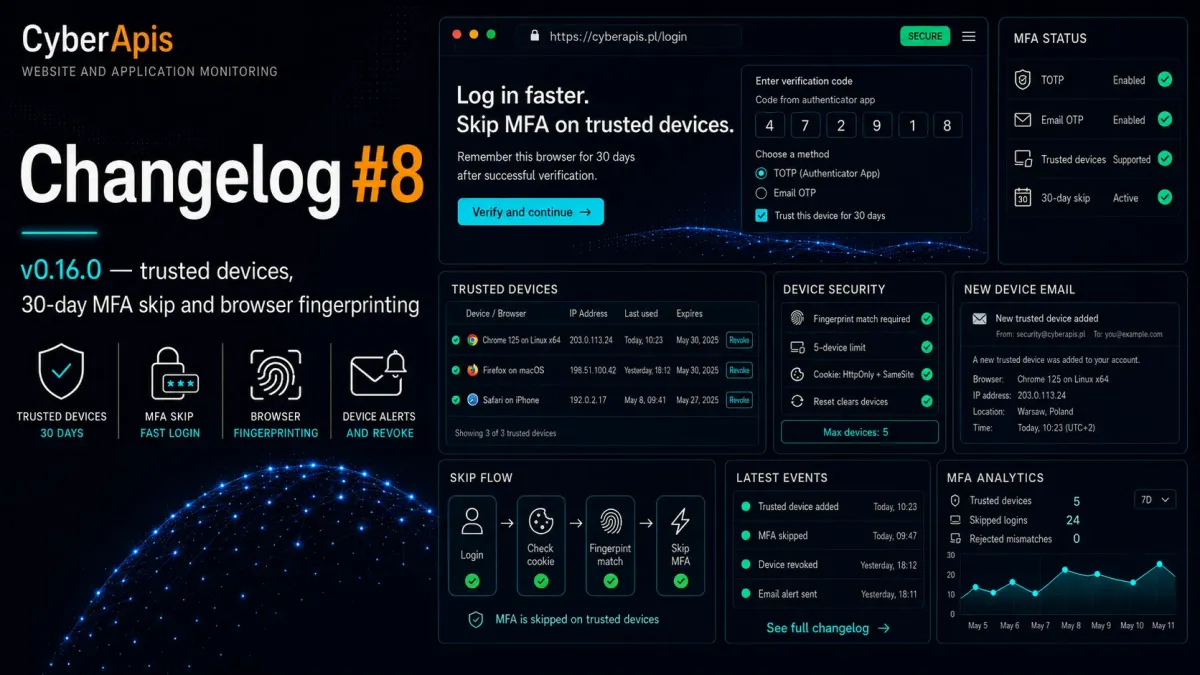
Trusted Devices — why MFA doesn't have to be painful
Two-factor authentication is one of the most effective account protection methods. The problem starts with daily logins — opening Google Authenticator, typing 6 digits, waiting for an email code. Repeated several times a day. In Cyberapis v0.16.0, we solve this with "trusted devices" — a cookie that remembers your browser for 30 days and skips MFA on subsequent logins.
How does it work under the hood? After a successful MFA login with the "Trust this device" checkbox checked, the system generates a cryptographic signature (SHA-256 of random bytes + app key), stores it in the trust_devices table, and sends it to the browser as a cookie called mfa_trusted. On the next login, before even showing the MFA form, the system checks whether the cookie is present, whether it matches a signature in the database, and whether the browser fingerprint matches. If everything checks out — MFA is skipped, login is complete.
New Features
"Trust this device" checkbox on the MFA screen
During the MFA challenge (TOTP or email OTP), an additional field appears: Trust this device for 30 days. Checked with a valid MFA code, it creates a trusted device and remembers the browser. Unchecked — standard MFA login, no device stored.
Trusted devices list in profile
The /admin/profile page now shows a "Trusted devices" section listing all remembered browsers. Each entry includes: device name (e.g., "Chrome 125 on Linux x64"), IP address, last used date, and expiration date. A "Revoke" button (with confirmation) lets you immediately invalidate the selected device.
Email notification on new trusted device
Every time a new trusted device is added, the system sends an email with the device name and IP address. If it wasn't you who added the device — you'll know immediately and can revoke it from your profile.
Security — 3 rounds of penetration testing
Before deployment, the system underwent three independent rounds of penetration testing. Here are the key security measures:
Browser fingerprinting — the device signature is more than just a random token. The system parses the User-Agent and stores browser version + operating system + architecture (e.g., "Chrome 125 on Linux x64"). A cookie from a different browser will be rejected.
5-device limit — maximum 5 trusted devices per user. The 6th device automatically evicts the oldest one (FIFO).
Cleared on MFA reconfiguration — any change to TOTP configuration (regeneration, disable, re-enable) immediately invalidates all trusted devices. The only exception: first-time MFA setup.
Cookie hardening —
mfa_trusteduses HttpOnly (inaccessible to JavaScript), SameSite=Lax, and Secure on HTTPS. The signature is salted with the application key (config('app.key')).mfa:resetcommand — emergency MFA reset also clears all trusted devices.
Supported MFA methods
Trusted devices work with every MFA type configured in Cyberapis: Google Authenticator (TOTP) and email OTP. The mechanism is transparent — it doesn't matter which method you choose during login.
Technical changes
New trust_devices table with indexes on [user_id, device_signature, expires_at]. Extended EnsureMultiFactor middleware with trusted device verification. Custom Filament login page (Login.php) with MFA skip and device creation logic. 21 new tests (53 total MFA tests). Configuration in config/twofactor.php with trusted_device_days (default 30) and max_trusted_devices (default 5) keys.